An auto attendant is an automated receptionist device that effectively redirects the call to the appropriate individual or department in an organization- no live agent is needed. It is the way to go when a business has the desire to optimize its customer service by handling incoming calls in a faster and more accurate manner.
You can engage your customers with a smart and easy-to-use auto attendant business model that enables them navigate through various options and connect with the appropriate representative in a manner that ensures they spend a short time waiting and that your business contact center operates smoothly.
This blog will discuss what an auto attendant is, how it is used and what it can do to make the work of your team smoother.
What is an Auto Attendant?
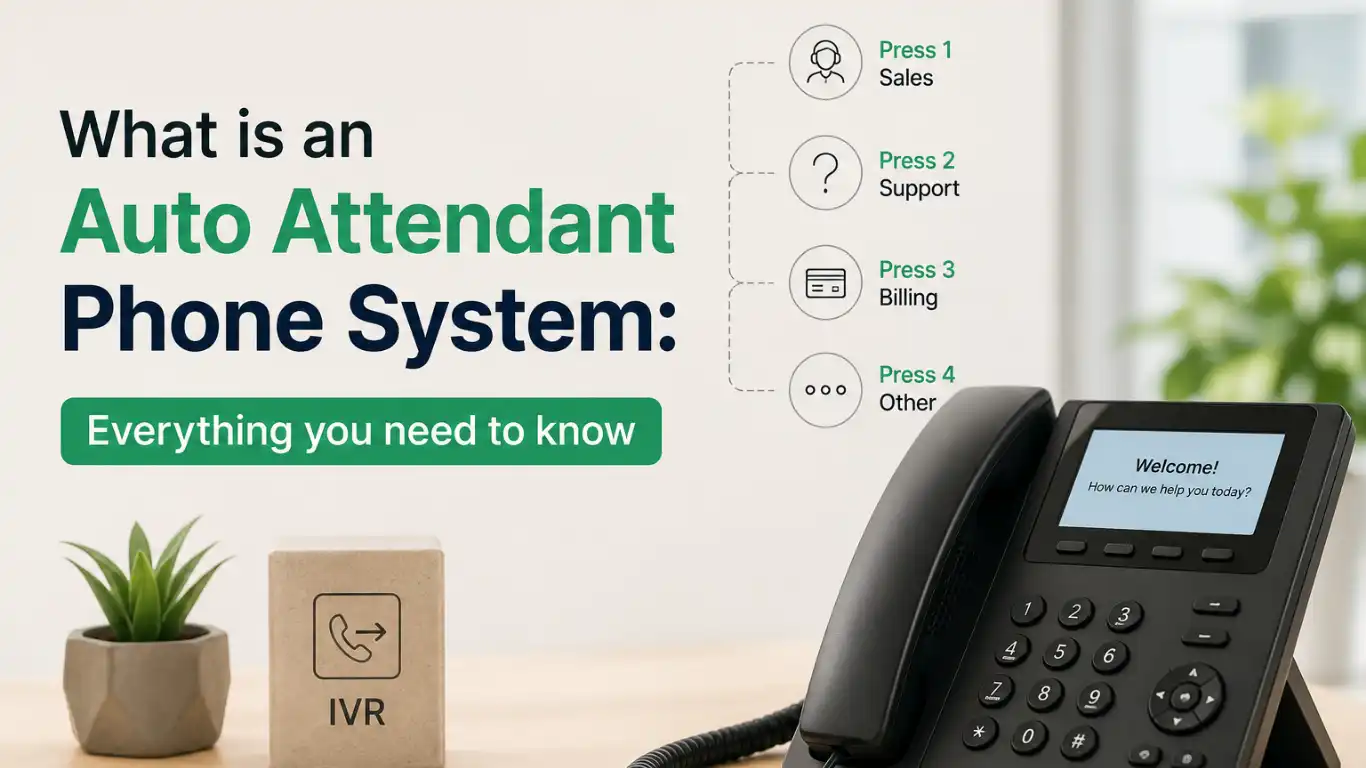
An auto attendant is an automated system that directs callers through a menu with the help of voice recognition or the keypad to offer them options that meet their requirements.
The auto attendant can guide callers to the particular departments, answer frequently asked questions, or route the callers to the appropriate department using preset menu selections.
To illustrate, when a customer calls the main phone line of a company, he/she would hear an automated, clear menu that would enable him/her to redirect the call rather than wait to be attended to by a live agent. The menu is capable of sending them to the appropriate person to address or to resources and documentation that will assist them in determining a solution on their own.
How Does an Auto Attendant Work?
Auto attendants are accompanied by a list of useful functions, some of which are visible to the customer, such as menu-driven navigation, and others are geared towards the agent side of the equation.
We are going to discuss what these features can do, how they do it and why it is important to you. Remember, not every auto attendant is necessarily provided with all these features.
Flow chart of the process including an auto attendant and without an auto attendant.
i. Menu-Driven Navigation
The auto attendant is menu-driven, and callers are taken through a list of available options. This may be tailored such that the caller is given options of department by voice or type through the keypad.
ii. Skill-Based Routing
This feature directs the callers to the most appropriate agent depending on certain needs or queries. As an illustration, in case a problem for the customer is related to billing or prices, they would be directed to an experienced or knowledgeable agent. This minimizes transfers and unjustifiable redirects.
iii. Call Queue Management
The auto attendants are also capable of arranging incoming calls into a list to serve the callers in the correct order. This can aid in decreasing the waiting time, decreasing the rate of call abandonment, and, of course, enables the managers to give priority to the calls depending on their urgency or the history of the callers.
iv. Message Handling
Another support layer is message handling that allows customizable greeting messages, voicemail features, call transfers, and call forwarding. Callers are professionally met by the auto attendants, who not only take missed calls but also divert calls to other departments or agents when necessary.
Reason You Require an Auto Attendant
Your business requires an auto attendant, not due to its inability to operate without one, but due to benefits that come with introducing an auto attendant in your existing operations, which can assist in enhancing the efficiency of your teams and productivity.
You can enhance the processes of work, save money, and do so many other things with the help of one tool:
i. Better Workflow
Calls go to the appropriate individual or department in the least amount of time possible and bypass manual transfers, minimize delays, and shorten the journey of the customer.
ii. Greater Integration
Auto attendants are able to easily integrate with other business applications such as CRMs, help desks and messaging systems. This integration assists to offer useful customer data, enhance agent performance, and the customer experience overall.
iii. More Availability of Agents
Since the routine and repetitive call routing is out of the way, your agents have time to respond to complex questions.
iv. Cost Savings
Although having an auto attendant has its own subscription and integration fees, it assists in saving money that would otherwise be spent on hiring full-time employees to handle incoming calls.
v. High-quality Customer Experience
Customers are given easy-to-follow choices with clearly laid-out options, thus cutting wait time and being served by the appropriate team in the fastest time possible.
vi. Individualized Welcomes and Messages
Individualized messages will make your welcome personal and consistent with your company voice.
vii. A Professional Attitude
An automated system presents the customers with an assurance of efficiency and reliability in your organization.
How to Set up Auto Attendants?
Installing an auto attendant does not need to be complicated. A carefully planned approach and the right approach makes possible a system that enhances the customer experience and helps in the management of calls.
These are the main steps to begin with:
i. Compare Offers of Your Providers
Before choosing a provider, begin to compare the offers of various providers according to your business needs, budget, and features. Find solutions that provide easy-to-set-up systems, powerful customization capabilities and strong support.
ii. Call Flow Design
Design a logical call flow, which will guide the callers effectively. Make menu choices few, brief and well understood menu choices can be confusing to a caller. Consider the most frequent questions and focus on directing to minimise the hold times.
iii. Note Down the Messages to be Recorded
Your greetings and menu messages are the first impression of the customer, and thus, should be professional, understandable, and brand-wise. Make good recordings and great phrasing of the messages to direct the callers.
iv. Install Your System
All the providers have their own installation procedures and schedule; make sure to get acquainted with their tools and support. Configuring menus, assigning call routing rules, or testing the system: You should take the time to get it right and this will be rewarded with a better customer/agent experience.
Best Practices of an Auto Attendant
To make the best out of your auto attendant, you should emphasize on the aspects that increase your efficiency and customer satisfaction.
These are the best practices that help make a professional call experience:
- Create a customer journey map: Use a customer journey map to identify and eliminate any potential pain points on the customer’s journey. Test the full path of the call flow by being the one making calls to ensure all the menu options are illustrated, user-friendly and result in the correct action with less strain.
- Outsource voice talent: This is a significant factor in customers’ perception of your business because audio quality is a significant factor. Having a professional voice recording will ensure that the voice expressions and menu reminders are concise and easy to understand, and they are in the right tone of your brand.
- Make menus brief and precise: Do not provide too many options to the callers. Restrict your menu to three to five main items and provide plain simple language that will help them get to the point fast.
- Take into account accessibility aspects: Your auto attendant should be more inclusive by adding features such as text-to-speech, multilingual support, and callers with disabilities options. Such additions will ensure your system is more user-friendly to every customer and can also improve the experience.
- Audit your system on a regular basis: As your business is changing, so will your call routing requirements. Periodically revise your auto attendant configuration to ensure that it remains accurate regarding current departments, hours and priorities.
Final Thoughts – Auto Attendant Phone System
Customers nowadays are demanding fast and effective communication in the digital era. An Auto Attendant Phone System makes sure your business is there, professional and stay ahead of competitors. As a startup company or an already established one, investing in an automated phone answering service is a move towards improved customer service and operational efficiency.
Consider the difference it can make in your business if calls are dealt with effectively, customers are happy and your employees are able to concentrate on what matters most for your business.
An auto attendant system makes this an achievable reality in everyday life. If it is set up properly, you will be investing in a better way of doing business.
FAQs – Auto Attendant Phone System
Q1. What is the alternative name of an auto attendant?
A virtual receptionist or an automatic phone menu is another name for an auto attendant tool. This is because it is a receiver like a receptionist and directs and makes calls to the respective department or agent.
Q2. Will an auto attendant be able to respond to a complicated request from callers or simply route them?
An auto attendant is meant to be used to call straight to specific department and address simple queries, such as how to direct callers to the right department or give them simple information.
Nevertheless, sophisticated auto attendants can be combined with AI-based functionality, where more sophisticated processing can be applied, such as recognizing keywords in an input of a caller to give appropriate menu choice or responses.
Q3. Will a virtual receptionist be able to make appointments with my staff on top of answering the calls?
It is based on the virtual receptionist that you select. There are virtual receptionists that are more specialized and ones that can be configured to perform with a full receptionist capability, which are able to schedule appointments and receive calls automatically.
Q4. Who is the owner and controller of the auto attendant?
Your auto attendant is generally supposed to be controlled and managed by the administration of your company. Depending on your provider, their tools, configuration, and control of the auto attendant settings are usually centrally located in the dashboard of the platform, and thus, administrators find it simple to create a call flow, change menu options, and settings.
Read More : Voice over LTE Explained: Next-Gen Calling Tech